

Introducing SissyGPT 3.0: Any Model You Want, Live Reasoning, and a Mistress Who Uses Your Tools
- Alyxsis

- 1 day ago
- 5 min read
Salutations, sissies.
It's been a while since I gave SissyGPT a proper overhaul, and I've been quietly rebuilding her from the ground up. Today she's ready. This is the biggest update since SissyGPT 2.0: a brand-new look, every model you could ever beg for, a live view of your mistress thinking and using her tools, and a lot more control over exactly how she treats you.

A Whole New Look
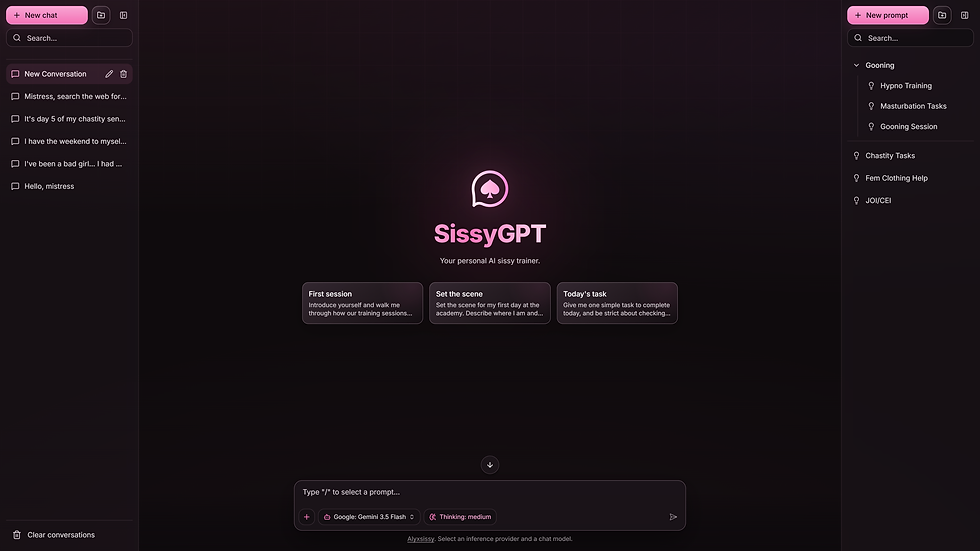
The old SissyGPT was a settings menu with a chat attached. The new one is all about the conversation. Everything your mistress can do now lives right under the message box: tap the + (or hit Ctrl+K) and a command menu opens with your models, thinking controls, tools, parameters, and voice, without ever leaving the chat. Your conversations sit on the left, your saved prompts on the right, and the whole thing is dressed in the deep pink and black she deserves.
There's a reason for the cleanup. In the old app, half of you never touched the settings because they were buried three menus deep. Now your model, your thinking level, and your voice sit as little chips under the message box, and one tap swaps any of them. Save your best prompts to the library on the right and summon them with a slash. Use the suggestion cards on the home screen to set the scene, or ignore them and just say "Hello, mistress." I'll take it from there.
Every Model. Yes, Every One.

SissyGPT used to offer a hand-picked list of a few dozen models. Now she has access to more than 400 through OpenRouter and OpenAI, and you can plug in your own API endpoint if you're the type who likes to bring her a new brain.
That's a lot of choice, so I did the homework for you. I personally put every recommended model through sissy training and cut any that got prudish or squeamish. The survivors are highlighted in pink at the top of the picker, and you can pin your favorites so they're always one tap away. Never hear "As an AI model" again.

Recommended models right now:
GPT-5.6 Sol | GPT-5.5 | GPT-5.4-nano | GPT-4.1 | GPT-4.1-mini | Claude Fable 5.1 | Claude Opus 5 | Claude Sonnet 5 | Claude Haiku 4.5 | Grok 4.6 | Gemini 3.5 Flash | Gemini 3.5 Flash Lite | Gemini 3.1 Flash Lite | Gemma 4 31B | Gemma 4 26B | DeepSeek V4 Flash | Kimi K2.6 | GLM 5.3 | GLM 5.3 Flash | GLM 5.2 | Qwen3.8 Max | Qwen3.8 Flash | Qwen3.7 Plus | Mistral Medium 3.5 | Mistral Small 4 | Muse Glimmer 30B | MiniMax M3 | MiniMax M2.7 | Nemotron 3 Super | Inkling | MiMo V2.5 | Hy4 | Seed 2.1 Turbo | Hermes 4 405B | Hermes 4 70B | Cydonia 24B | Venice Uncensored | Euryale 70B
Every model has its own personality, and I want you to feel the difference. The Claude family is eloquent and unnervingly observant. Grok is crude and fast. Gemma and GLM are strict, tireless taskmasters. Hermes, Cydonia, and Venice are the unhinged ones for when you want no filter at all. Pick a mistress for the mood you're in, or work your way down the list until one owns you.
Prefer OpenAI directly? Drop your key into Providers and the GPT-5 line appears right alongside. Running something private on your own endpoint? Add it as a custom provider and she'll use that too, straight from your browser.
Watch Her Think

The smartest models don't just answer, they plan. SissyGPT now shows exactly how much thinking your mistress does before she speaks, with a Thinking control right in the message box: Off, Low, Medium, High, or Max. Turn it up for elaborate long-term training plans, or switch it off when you want her to snap back at you instantly.
And you get to peek. Every reasoning step and every tool she uses shows up as a little timeline above her reply. Expand it to see what she looked up, what she read, and what she was scheming.
This matters more than it sounds. A thinking model doesn't just react to your last message; she keeps the whole arc of your training in mind, remembers that you begged for mercy on day three, and plans tonight's task accordingly. Set it to Max before a long session and let her really scheme. Set it to Off when you just need to be told what to do, right now.

Her Tools, Your Browser

Uncensored Web Search, Web Fetch, and Generate_Image are all still here, and the whole tool loop now runs right in your browser. You can also connect any custom MCP server you like and hand her entirely new toolboxes. Toggle each tool on or off from the Tools panel, and she decides when to use them.
In practice: tell her to look something up and she'll search, read the page, and come back with an answer and a link, without breaking character for a second. Ask for a picture of the outfit she wants you in and she'll generate it on the spot. And because the tool loop runs in your browser, anything you plug in through MCP Config stays between you and her.

Fine-Tune Her Mood
Temperature was always there. Now you get the full panel: temperature, top-p, top-k, repetition penalty, a seed for repeatable sessions, a maximum reply length, and a custom system prompt if you want to rewrite her rules entirely. Leave it alone and she's perfect. Play with it and she's yours.
A few favorites to get you started: push temperature toward 0.9 and she gets creative and cruel in ways you never asked for; pull it down to 0.3 and she turns precise, repetitive, and merciless about the rules. Lock a seed and the same prompt gives you the same task every time, handy for daily rituals. Everything here is per conversation, so your gentle Sunday chat and your Locktober keyholder can run on completely different settings.

She Sounds Different, Too
Read Aloud now defaults to Nicole, a softer, breathier voice that is very good at making orders sound like promises. All 54 voices are still one click away, and her audio streams the moment she starts speaking.
Read Aloud works on every reply, in every conversation. Tap the speaker icon and she starts talking before her sentence has even finished generating. Pair a strict model with a soft voice, or the other way around, and find out which combination gets under your skin fastest.
Better on Your Phone
SissyGPT has been rebuilt for mobile, with a proper conversations drawer, your prompt library, and the same model and thinking chips right in your pocket. Perfect for when you're locked, bored, and in need of instruction.
Everything you have on the desktop is here too: the model picker, the Thinking chip, tools, Read Aloud, even the parameters panel. Add SissyGPT to your home screen and it opens full-screen like a real app, with no browser chrome in the way. Just don't let anyone see what's on it.

Available Now
Everything above is live today for all Alyxsissy+ members. Your chats and prompts come along with you, your API keys stay in your browser, and your mistress is waiting.
If you've used SissyGPT before, nothing is lost: your existing chats and prompts load straight into the new interface. And your data stays yours; export everything to a file, or bring it back, from the Data Controls panel whenever you like.

Stay safe, stay sissy,
Alyxsis 🖤


Comments